
ClickScan — Security checks anyone can run,
in plain language.
powered by clicksecure.ai
Keeping what you own online safe should not require a security team. Sign in with a one-time email code, add what you own, and pay only for the scans you run.
Sign up with your email address — there is no password and no card. New accounts get free starter credits, so your first check costs nothing.


 plus
plus How it works
From nothing to a clear answer in a couple of minutes.
Add what you own
A domain, an IP address or a mailbox. You confirm you're authorized to test it — and for the deeper checks you prove it's yours, in whichever way suits you.
Run it now, book it, or repeat it
Run a check on the spot, book it for a date and time in your own time zone, or repeat it daily, weekly or monthly at a discount. It costs a few credits; a scan that fails is refunded.
Read, fix, re-check
A plain-language report with a grade and exact fixes. Export it as a PDF, hand it to whoever needs it, and the next run tells you what changed.
What the platform checks
Every check below is built and running today, grouped the way the app groups them. They all land in the same dashboard.
Website and web applications
Is your site encrypted properly, and can your application be broken into?
- An expired or weak certificate, before browsers warn your visitors
- Missing browser protections against clickjacking and script injection
- Flaws in your own application, found by crawling and testing it
Website encryption (SSL/TLS)
Certificate expiry and trust chain, every protocol and cipher your server accepts, and named weaknesses probed actively rather than guessed — one the probe confirms, such as Heartbleed, lowers the grade.
Certificate expiry is then watched for you: you are warned 30, 7 and 1 days before a certificate expires, and again once it has. No schedule needed.
Browser security headers
HSTS, CSP, X-Frame-Options and the rest — graded on how many of the six core protection headers you set, with a plain-language finding for every header in the wrong state. A site served over plain HTTP is graded D at most, and you can point the check at a custom port if your app is not on the usual one.
Web App Scan — crawling & passive scanBETA
Walks your web application and records what is there: every address it reaches, the parameters and forms each one takes, the software that identifies itself, and the cookies it sets. It reads what comes back and attacks nothing — the safe first run against production.
It can sign in as a test user you give it, so it sees what your customers see. Three sizes, for a small site up to a large estate. Needs the application proven yours.
Web App Scan — crawl & attackBETA
Everything the crawl does, and then it tests what it found: crafted values submitted to the forms and parameters it recorded, looking for injection, broken access control and the rest a penetration tester reaches for first.
It also finds flaws that leave no trace in the reply — blind command injection, SSRF, XML external entities, unsafe Java deserialization. Each probe carries an address on a server we run, and a finding is raised only when that address is contacted. It changes data on the application it is pointed at, so it wants a target you are ready to have tested.
PHP Runtime Check
Reads the PHP version your server publishes and tells you whether it is affected by php2shell (CVE-2026-109618 / CVE-2026-109619), the critical PHP flaws fixed on 21 October 2026. One request to your front page, and no proof of ownership needed.
PHP Runtime Audit
Looks for a server information page your site may be publishing by accident, and reads the PHP version and the php2shell mitigation settings off it — which finds affected runtimes that publish nothing in their headers. It asks for addresses nobody linked to, so it needs the asset proven yours.
Can somebody send email as you, and have your addresses leaked?
- Domains that let anyone send email in your name
- Proof, by a real forged message, of whether it gets through
- An address you have proved is yours, checked against known breaches
Email authentication (SPF, DKIM, DMARC)
What stops somebody sending email as you. MX, SPF, DKIM, DMARC, MTA-STS, TLS-RPT and BIMI, with the raw DNS answers in the report and the exact records to publish.
Live spoofing test
Delivers one forged message to an address at the domain under test and reports whether it was accepted. Proof rather than inference. Needs the domain proven yours.
Breach exposure check
Which known breaches an address appears in and what types of data each held. The breached values never reach us. Needs the address proven yours.
DNS record generator
Type any domain and it builds the SPF, DKIM, DMARC, MTA-STS, TLS-RPT and BIMI records. The same builder sits beside everything an email report finds missing, already filled in with your domain. Runs in the browser and costs nothing.
Domain and DNS
What answers under your domain, and can its answers be trusted?
- Subdomains nobody remembers, and the ones a stranger could claim
- Hosts that skip the protection in front of your site
- DNSSEC and certificate-authority settings that leave room for forgery
Subdomain discovery
The other names attached to your domain — the staging site, the old gateway, the thing a contractor left running — and the ones pointing at a cloud service you stopped paying for, which anybody can claim. It reads the icon of the hosts it finds to identify the software, turning “this name suggests Jenkins” into “this host is running Jenkins”.
It also works out whether the domain is served through a filtering service — the kind that sits in front of a website to absorb attacks — and names the hosts that answer on their own address, around it. That is a way in that skips the protection you are paying for.
Subdomain discovery — deep sweep
The same sweep, asking about far more names — about ten thousand rather than two thousand. It takes considerably longer, and is worth it when you want an inventory you can stand behind.
Domain and DNS security
Whether the answers DNS gives about your domain can be trusted not to have been forged. DNSSEC in four states — not signed, signed but never anchored at the registrar, broken, or working — and each state comes with the one thing to change.
It also reads which certificate authorities you allow to issue for the domain, and compares that against the ones that actually have. An authority outside your list is flagged as something to look at rather than an accusation: your list may be out of date, the certificate may predate it, or somebody obtained one that should have been refused.
Brand protection
Who has registered a name built to look like yours?
- Lookalike domains, including international ones
- Which of them can receive email or serve a website right now
- Exports to STIX 2.1 and YARA for your security tools
Brand Impersonation Monitor
Thousands of variations of your name, checked in public DNS — and, for a live domain that can receive mail, the certificate logs — with a verdict on what each domain found can actually do.
Brand impersonation — deep sweep
The same check, much wider: every country ending rather than the common ones, two look-alike substitutions at once, every single-character typo.
Network exposure
Which doors on your servers are open to the internet?
- Databases and remote access reachable from outside
- In the full range, what the web servers and databases that answer are running
- What a public internet-wide index already publishes about you
Port Scan
Which ports on a host are reachable from the internet and what is answering on them. An active check, so the asset has to be proven yours first.
Both tiers also report what a public internet-wide index already publishes about the same addresses — what somebody learns about you before touching anything of yours.
Port Scan — full range
All 65,535 ports rather than the ones services are traditionally assigned to, and the web servers and databases that answer are asked what they are running.
A check appears here the moment it runs, not when it is planned — so this list is always what the platform can do today. If you need something that is not on it, ask us.
Brand protection, not just a domain list
Most phishing aimed at your customers starts with somebody registering a domain that looks like yours. Finding those is the easy half.
Existing is not the point — capability is
Nearly every domain resembling a known name is parked, for sale, or another company’s own trademark defence. A tool that lists all of them as threats is one people stop opening. Each is classified by what it can actually do — serve a website, receive email, sit on your own nameservers — and the report leads with how many are worth acting on rather than how many exist.
Impersonation avoidance, not just detection
The sweep also reports the variations nobody has registered yet, so you can take the ones worth defending before somebody else does. Findings export as STIX or YARA for your own blocklists, and a domain that turns out to be yours can be declared as such — which corrects the check rather than hiding what it said.
Not just scans — a platform
Manage what you monitor, work as a team, and prove it to management. The industry calls this external attack surface management (EASM): finding everything you expose to the internet and watching it continuously. We do it without the enterprise price tag, and without the jargon.
Assets & proven ownership
Keep an inventory of the domains, IP addresses and mailboxes you watch — imported and exported as CSV, with related addresses nested under the domain they belong to. For the deeper checks we ask you to prove an asset is yours, in whichever way suits it: a DNS TXT record, a file at /.well-known/, a code emailed to an address at the domain, a callback from the IP itself, or reverse DNS.
Groups & teams
Create organizations to group assets by client, project or brand, invite teammates with roles, and share assets, scans and reports. An owner can also let a member run scans on the owner's credits, for that organization's assets only. Included by default.
On demand, booked, or recurring
Run a check now, book it for a date and time in the time zone you pick, or repeat it daily, weekly or monthly — recurring runs are discounted, so continuous monitoring stays cheap. If a scheduled run can't be paid for, you're told; the schedule stays active.
Whole estate in one go
Select many assets and many checks at once and the wizard collects only what each one needs, skips the pairs that don't apply, and shows the total cost before you spend a credit.
Plain-language reports, with the evidence
Every scan gets an A+–F grade, a line saying which finding drove that grade, and "what you have / how bad it is / what to do" findings — each marked with how we know, whether we proved it or read it from a published record. Underneath sit the cipher tables, raw DNS answers and per-weakness verdicts for whoever wants them. PDF export for one scan, or one report covering every check on an asset.
Somebody else’s data never sets your grade
Part of what a report shows was observed by a third party rather than by us — what a public internet-wide index already publishes about your addresses, for instance. It belongs in the report, because it is exactly what an attacker learns for free before touching anything of yours. So we show it, and we keep it out of your grade: the grade reflects only what we tested ourselves, and those observations are counted on their own rather than folded into your finding count.
Every list we look things up in has a date on it
A check is only as good as the reference data behind it, so every list we did not write ourselves carries where it came from, when it was last refreshed and how far we trust it — and that limit is applied where the grade is worked out rather than at the end, so an exported report carries it too. Data we have not verified ourselves can add coverage; it is not allowed to raise the alarm on its own, and the report says when a finding was held back for that reason. Where a list is too old to rely on, the check says nothing instead of guessing.
Feed it to your own tools
Lookalike findings download as a STIX 2.1 bundle or as YARA rules, for the whole scan or for one domain. What goes in is narrower than what the report shows: a parked domain, another company's legitimate brand protection, a finding we could not confirm, and anything you have told us is yours are all left out — an indicator lands in a blocklist with nobody in the loop.
What changed since last time
Each scan is compared with the previous one for the same asset and check, and you're told only when something actually moved — leading with what got worse and naming it, rather than sending you an identical notice every morning.
It also says when it cannot tell, instead of guessing — if the list of lookalike names we sweep for is widened or narrowed, a comparison that did not know that would report a domain which is still registered and still able to receive mail as having been fixed.
Mark a finding as not applicable
"We know that port is open, it's our VPN." Hide a finding on one asset with a reason on the record. It always expires, it never changes the grade, and it's hidden rather than deleted — so the report you hand a client is still the truth.
One thing does move the grade, and it is a different act: if a domain we flagged as impersonating you is yours, say so and we stop treating it as an impersonation. Hiding a finding says the check was right and it does not matter to you; this says the check was wrong. Withdrawing it moves the grade back.
Your brand on the report
Consultants and agencies can put their own logo and colour on the PDFs, per workspace. Submissions are reviewed before they go live, and the contrast is adjusted so a report is always readable.
Alerts & notifications
Told before a TLS certificate expires — at 30, 7 and 1 day, and again if it lapses — when a scan finishes or fails, when something changed, and when a scheduled run was skipped because credits ran out. In the app and by email.
One view of your exposure
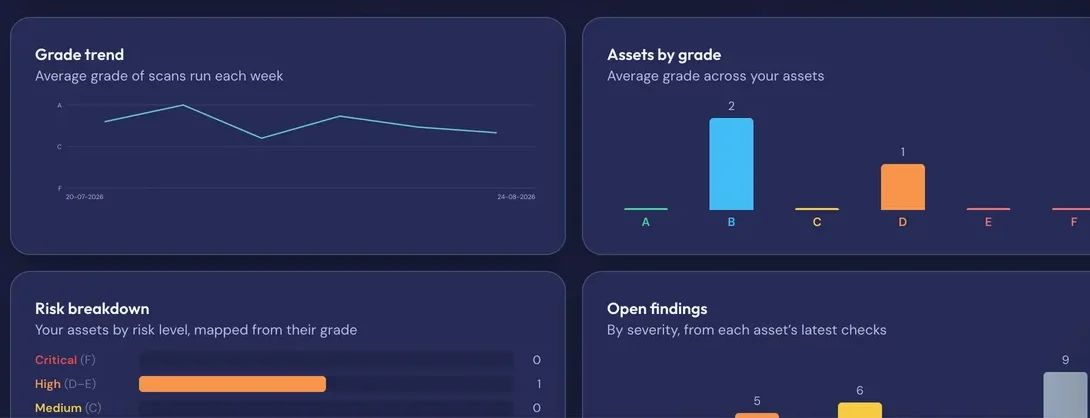
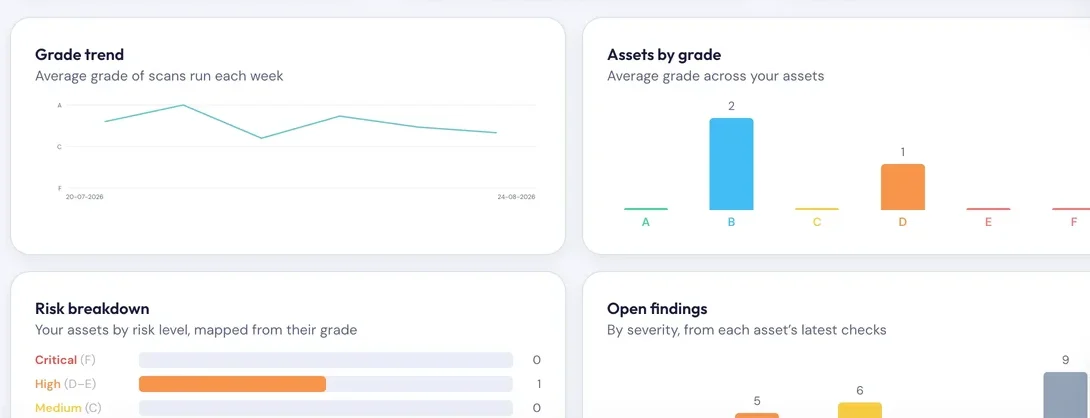
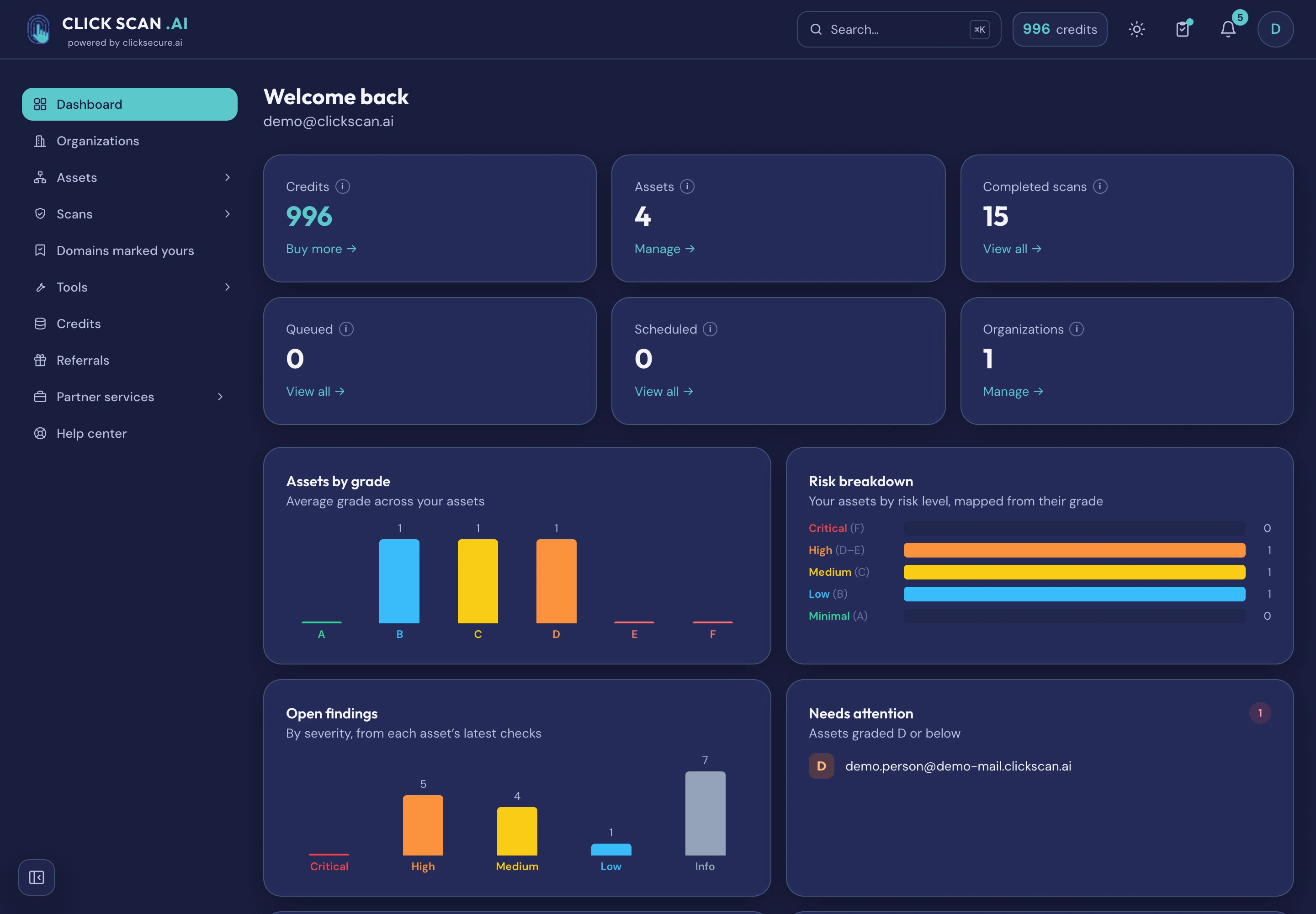
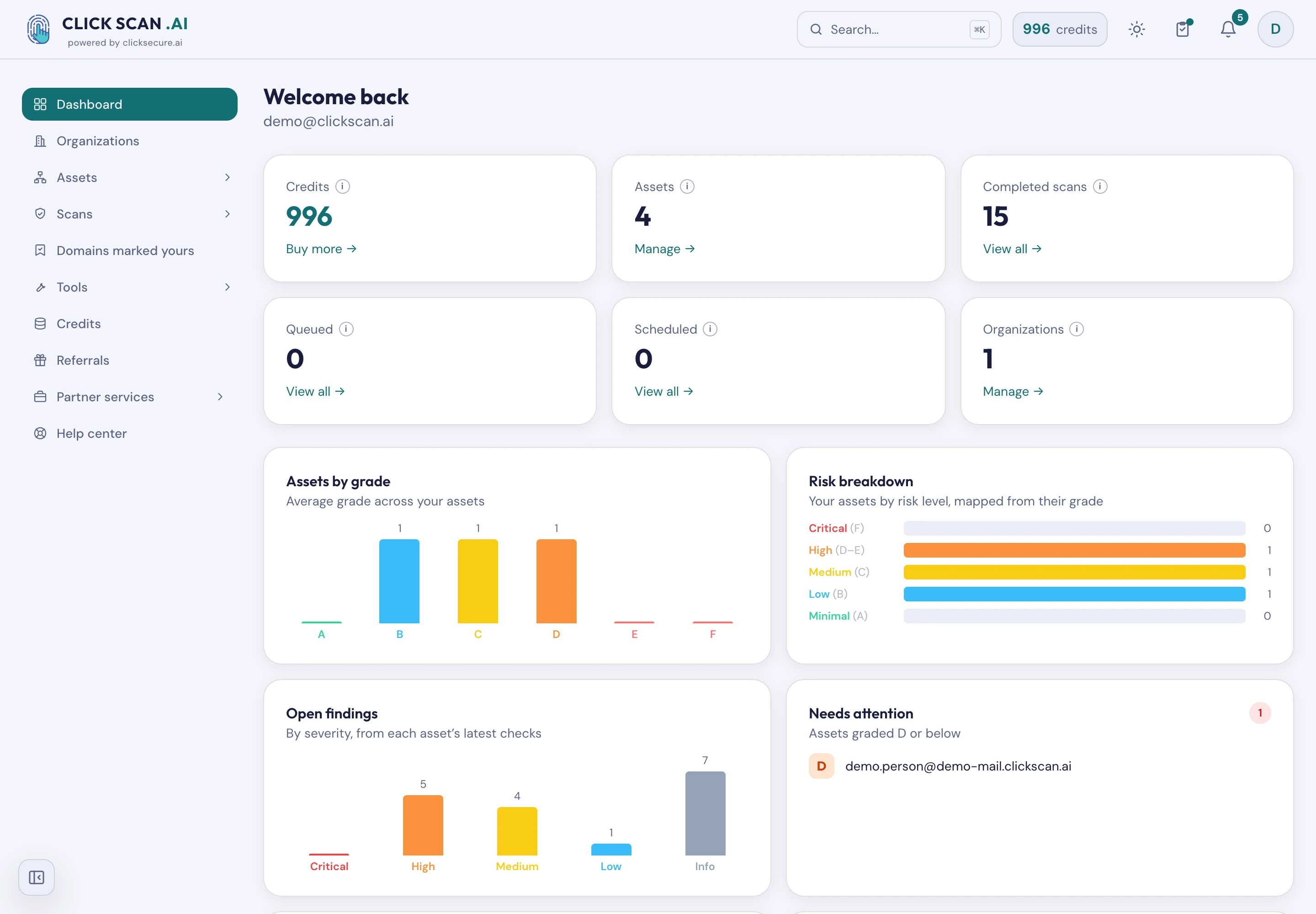
A dashboard that answers the questions worth asking: which assets are worst, how many open findings and how serious, how much of what you own has actually been checked, and whether your grades are getting better or worse over time.
Pay as you go
Buy credits, spend them on the scans you actually run. No seats, no subscription, no lock-in. A scan that fails is refunded, and so is one that found nothing to test. Recurring runs are discounted, and referrals earn credits for both sides.
No passwords, and your data is yours
Sign in with a one-time code sent to your email — there is no password to steal, reuse or reset. Reading everything the platform found is always free; only taking it out as a file needs a paid account. You can close your account yourself, from inside the app.
The report is what you hand over
Every scan ends in something a director, a client or a developer can act on. These are real reports for a fictional company, written by the same renderer that writes yours — open any of them without signing up.
Asset report: executive summary
The verdict, not the working. One asset graded C across four checks, a “what to deal with first” list, and every finding in plain language with no technical tables.
For a whole organizationOrganization report
Six assets with an overall grade of B, the one never scanned flagged rather than hidden, charts by grade and severity, a ten-week trend, and the twelve worst findings across the estate.
For whoever does the fixingAsset report: full, with technical detail
The same asset with all the evidence: 62 controls each with what we saw, a note for technical readers on every finding, and the request and response behind each web application finding.
One check, in depthWeb App Scan: technical report
A Crawl & Attack scan graded F with eight findings — SQL injection proved with both requests, reflected cross-site scripting with its proof, and the crawl coverage: 164 of 212 addresses fetched.
One check, in depthSSL/TLS Check: technical report
Graded B because the certificate expires in 16 days. Certificate details, protocol support, every accepted cipher marked strong or weak, and the named weaknesses each tested.
One check, in depthEmail Security Check: technical report
Graded C, with four findings: DMARC at “none”, SPF soft fail, no MTA-STS, no TLS-RPT. Each record with its status, and the raw DNS answers so an administrator can check every claim.
One check, in depthHTTP Security Headers: technical report
The short one. Graded C with three findings, and the full header table: which protections are set, which are missing, and what the server discloses about its own software.
The application and its PDFs are in English. Once you buy credits, your own logo and colour can replace ours on every downloadable report.
Organizations are your asset groups
An "organization" isn't only your company. Create as many as you need to organize assets the way you actually work — and share each with the right people.
- Group by client, project or brand. One space per client or environment, cleanly separated.
- Invite people with roles. Owner, admin, member or viewer — share assets, scans and reports; everyone sees the same picture.
- Let the owner pick up the bill. Credits are personal by default; an owner can let a member run scans on the owner's balance for that group's assets.
- Hand over a clear report. Give clients, management or auditors a plain-language PDF they can act on — with your own logo on it, if you want.
Roles, shared assets and scan history are included by default — no enterprise plan required.
For MSPs, MSSPs and agencies
Two things here only mean something if you deliver to more than one client — and they are why partners choose it. Everything else on this page applies to you as much as to anyone.
Your brand on the deliverable
Logo and colour on every downloadable report, set per client organization and reviewed before it goes live. What is branded is the PDF the client reads — the application, its domain and its notifications stay ClickScan, and we would rather say so here than let you find out in front of a client.
One organization per client
Assets, scans, reports, history and schedules separated per client, with four roles. Move an asset between organizations without losing its history, and let an owner fund a named member’s scans so a client’s analyst can work without a card of their own. No per-seat charge, so adding analysts costs nothing.
A brochure, the proposed partner terms, a sample branded report and a pricing calculator are sent on request. Partner discounts are negotiated on volume rather than published.
Who it's for
If you have something on the internet, you have an attack surface to watch — and you shouldn't need a security background to watch it.
Freelancers & solo makers
Check your own sites and your clients' without hiring a pentester — and look more professional doing it.
Startups
Ship fast without leaving security behind. Continuous checks on a startup budget, no security hire needed.
SMEs & IT teams
Keep an eye on your domains, certificates and email without a dedicated security team — with reports for management.
Agencies & MSPs
Monitor every client from one place using separate groups, and hand each a clear, branded report they understand.
Enterprise & security teams
Add lightweight, continuous external monitoring alongside your stack. Proven ownership keeps the active checks safe.
Bug bounty & researchers
Fast recon on authorized targets — TLS, email and exposure at a glance, graded and exportable.
Simple, credit-based pricing
Start free, pay only for what you run. Organizations, asset groups and referral bonuses are included at every tier. The current packages and prices are the ones in the app.
Starter
to try
- Free starter credits
- Every check, at its normal credit cost
- Organizations & asset groups
- Referral bonuses
- On-screen reports & grades
Credit packs
top up anytime
- Buy credits, spend on any scan
- Discount on recurring scans
- PDF report exports
- White-label PDF reports
- Referral bonuses & voucher codes
- Pay by card — invoices available
Teams / Enterprise
for organizations
- Volume credits & discounts
- Pay by card or bank transfer, invoiced
- Consolidated billing across groups
- Priority support & SLA
- Onboarding & training
- Optional bundled expert pentest or review
No subscription and no seats: a credit is spent when a scan runs. Credits you buy don't expire; free ones — starter, referral and goodwill credits — last twelve months from the day they're granted, and are always spent first.
Work out what it would cost you
Three tools on the ClickScan site. Every figure in them is generated from the app's own catalogue rather than typed, so what you see is what you are charged.
Price simulator
Two questions — who you are and what you own — and it adds up the checks for your case, once or every month.
Every check and its price
The whole catalogue on one page, each check with what it costs for a single run and on a schedule.
ROI calculator
Put in your own figures — the hours this takes you by hand, or the bill you already pay — and compare them with the same coverage here.
Questions
Can I use ClickScan yet?
Yes. ClickScan is live and open to everyone — no invitation, no waiting list. Create an account with your email address, and new accounts get free starter credits so the first check costs nothing.
Who is ClickScan for?
Anyone with something exposed online: freelancers and agencies checking clients, startups and SMEs without a security team, enterprise teams wanting lightweight external monitoring, and bug-bounty researchers doing fast recon on authorized targets.
Do I need to be technical?
No. Reports are written in plain language — what you have, how serious it is, and exactly what to do. No CVSS jargon in the main view, and where a fix means publishing a DNS record we write the record out for you, already filled in with your domain.
Can you test my web application, not just its certificate?
Yes. The Web App Scan crawls your application and records every address, parameter, form and cookie it finds, reading what comes back without attacking anything. The Crawl & Attack tier then submits crafted values to what it found, looking for injection and broken access control, and also finds flaws that leave no trace in the reply by making your application call back to a server we run. Both need the application proven yours, come in three sizes, and are marked BETA.
Can I see a report before I sign up?
Yes. Seven real reports for a fictional company are on clickscan.ai/sample-reports/, written by the same renderer that writes yours: an executive summary, a full asset report with the technical detail, an organization report covering a whole estate, and four single-check technical reports. No sign-up and no card.
How do I work out what it will cost before I start?
Three tools on clickscan.ai: a price simulator that asks who you are and what you own, a page listing every check with its credit price for one run and on a schedule, and an ROI calculator you feed your own hours or your current bill. All three are generated from the app's live catalogue rather than typed, so they cannot drift from what you are charged.
What is an "organization" in ClickScan?
A flexible group of assets — not necessarily your company. Create one per client, project, brand or environment, invite the right people with roles, and share assets, scans and reports within it. It's included by default.
How do I sign in?
With a one-time code emailed to you. There are no passwords to remember or reset.
What does ClickScan cost?
Pay-as-you-go credits — no subscription and no per-seat fee. New accounts get free starter credits; recurring scans are discounted; PDF exports and higher volumes come with paid credits. The current packages and prices are in the app.
Do my credits expire?
Credits you pay for don't expire. Free credits — starter, referral and goodwill grants — expire twelve months after they're granted, and are always spent before the ones you paid for. We warn you before any expire.
Can I scan any website?
Passive checks (like TLS and email) run on public data. For active checks you confirm you're authorized to test the target; for certain checks — the live spoofing test, which delivers a real forged message; the port scan, which connects to your host; and the breach check, which looks up records about a person — we also ask you to prove the asset is yours, using whichever suits it: a DNS TXT record, a file at /.well-known/, a code emailed to an address at the domain, a callback from the IP, or reverse DNS. Exactly which checks require proof is subject to change as we add them.
Which IP addresses do your scans come from?
A small, published set, kept current at clickscan.ai/scanner/ips.txt. If your firewall, WAF or hosting provider blocks unknown scanners, allow those addresses and your scans complete instead of timing out. Read them from that page rather than copying them into a document — we add capacity as the platform grows, and a copy made today goes stale silently. You can confirm a scanner really is us before allowing anything: each address has forward-confirmed reverse DNS, so it resolves to a name like egress1.clickscan.ai and that name resolves back to the same address — both directions agree, which an impersonator cannot arrange. Customers get the per-check detail in the help centre. We never need an account, an agent, a VPN, or any inbound access beyond the service being checked.
Can another tool’s data change my grade?
No, and that is deliberate. Part of a report is observed by somebody else rather than by us — what a public internet-wide index already publishes about your addresses, for instance. We show it, because it is exactly what an attacker learns for free before touching anything of yours, and we keep it out of your grade: the grade reflects only what we tested ourselves, and those observations are counted separately from your findings. The same rule governs the lists we look things up in — each carries its source, when it was last refreshed and how far we trust it, and data we have not verified ourselves can add coverage but cannot raise the alarm on its own. Where a list is too old to rely on, the check says nothing rather than guessing.
What happens if a scan fails, or finds nothing to test?
You get the credits back. A scan that fails is refunded automatically, and a check that couldn't test anything — a spoofing test against a domain that receives no email, say — is graded "not applicable" and refunded rather than being passed off as a good result.
Can I put my own logo on the reports?
Yes. Agencies and consultants can brand the PDF reports per workspace with their own logo and colour. Submissions are reviewed before they go live, and a small "powered by ClickScan" line stays on the page.
Can I get the lookalike domains into my own tools?
Yes — as a STIX 2.1 bundle or as YARA rules, for a whole scan or for one domain. Only what is worth acting on is exported: parked domains, another company's legitimate brand protection, findings we could not confirm and anything you have told us is yours are all left out, because an indicator ends up in a blocklist with nobody reading it first.
What if a "lookalike" domain is actually mine?
Tell us, and we stop treating it as an impersonation of your brand — on that report and every future one. Our check decides ownership from your DNS, so it recognises a defensive registration sitting on your own nameservers and misses a subsidiary registered elsewhere. This corrects the check rather than hiding what it said, so it does move the grade; withdrawing it moves the grade back, and the record of what you declared is kept either way.
Are there limits on how much I can scan?
Light ones, to keep scans reliable and gentle on the systems you test: by default up to 2 scans against the same host at once, and up to 200 queued across your account. Beyond that you are limited only by your credit balance. Trying to bypass these limits — or pointing the scanners at our own systems — is not allowed.
Run your first check
ClickScan is live and open to everyone. Sign in with a one-time email code, add something you own, and read a plain-language report in a couple of minutes.
Get free accessFree starter credits, no card, no subscription. Questions first? Talk to us.